

PaperColor
PaperColor: A Digital Drawing App for Creative Minds
PaperColor: A Digital Drawing App for Creative Minds
If you're anything like me and have a passion for doodling, sketching, or just letting your creativity flow, then the PaperColor app is one not to miss. Available for both Android and iOS, this app takes the classic feel of drawing with paper and pencil and gives it a digital twist, making it a fantastic tool for artists of all levels.
First things first, downloading and setting up PaperColor is a breeze. Head over to your app store, search for "PaperColor," and hit download. The app is lightweight, so it won’t take up much space on your device, and it opens up quickly, ready for you to dive into your artistic endeavors almost instantly.
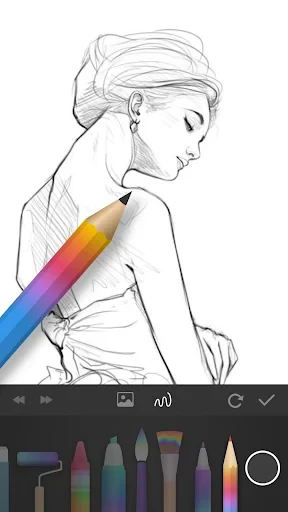
One of the standout features of PaperColor is its intuitive user interface. As soon as you open the app, you're greeted with a clean, uncluttered canvas. The tools are neatly arranged around the canvas, allowing you to focus on what matters most—your art. It’s as if the app disappears and leaves you alone with your creativity.
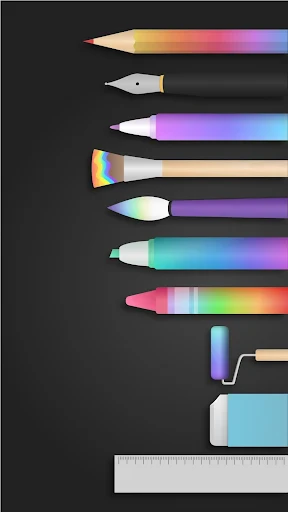
The app offers a variety of brushes and pencils, mimicking the textures and strokes of real-life tools. Whether you’re into fine detailing or broad strokes, PaperColor has got you covered. What I love about this app is how it caters to both beginners and advanced artists, providing tutorials and guides to help hone your skills.
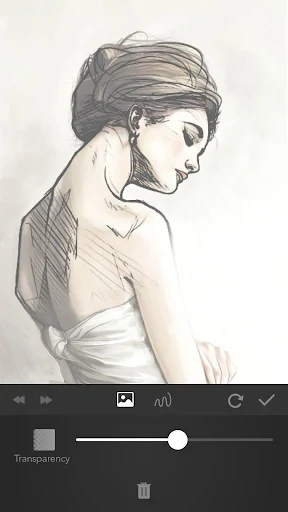
PaperColor is packed with features that make it an artist's dream. The app includes options to import photos and trace over them, perfect for developing skills or creating intricate drawings effortlessly. There's also a color palette that offers a wide range of shades, allowing for precise color selection to match your vision.
Another nifty feature is the layering system. Much like professional desktop software, PaperColor allows you to work with layers, giving you the flexibility to edit specific parts of your artwork without disturbing the whole piece. This is a game-changer, especially for those working on complex projects.
Absolutely! With its user-friendly interface, comprehensive toolset, and robust features, PaperColor stands out in the crowded field of drawing apps. Whether you're a seasoned artist looking for a digital space to create or a beginner eager to explore your artistic side, this app is a perfect fit.
In addition to its features, PaperColor's community aspect is worth mentioning. You can share your artwork within the app's community, receive feedback, and even gain inspiration from other artists. It's a great way to connect with like-minded individuals and grow your skills.
Overall, PaperColor offers a seamless blend of simplicity and functionality, making it a top choice for digital drawing enthusiasts. So, grab your stylus, download PaperColor, and start creating masterpieces right from your device. Trust me, you'll be glad you did


- Developer
- Eyewind
- Version
- 2.9.11
- Installs
- 10,000,000+
- Android Version
- 5.0
- Content Rating
- Everyone
- Price
- Free
- Intuitive user interface for easy navigation.
- Wide range of brush options for creativity.
- Realistic drawing experience with vibrant colors.
- Supports multiple layers for complex artworks.
- Compatible with stylus for precise drawing.
- Limited free version features.
- Occasional app crashes reported.
- No cloud sync for artworks.
- Advertisements in free version.
- Requires in-app purchases for advanced tools.


